
Cloud access control
Cloud Based Access Control Systems: Standardizing Multiple Sites Without Losing Offline Entry
Inherited a mix of door systems across sites? Plan cloud based access control around what each door decides locally, what syncs and what happens offline.
Before you choose
Key takeaways.
- The cloud manages; the door executes. Every door still needs local hardware that keeps working within known limits.
- Map where permissions are stored at each door before you migrate. On some systems they live on the terminal or reader, not the controller.
- Offline behavior depends on the device application, operating mode and protocol. Get it in writing and test it.
- Reuse existing readers only where the protocol is confirmed. A matching port is not enough.
Overview
Cloud based access control systems move administration (users, permissions, schedules and logs) to a hosted platform, but the door still depends on local hardware: a reader or terminal, a controller where one is used, and a lock. So the most important buying questions are about the door, not the cloud: which device holds the permissions, what it does when the link to the platform drops, and which existing hardware can stay when you migrate several sites onto one system.
What does "cloud based" change, and what doesn't it change?
The cloud manages people, schedules and events; the door still executes locally.
A cloud platform gives you one place to add and remove people, set schedules, push permissions to many sites and collect events. It removes the on-site server and makes remote administration easier.
It does not remove the door. Someone still presents a credential to a reader, a decision still has to be made, a relay still has to release a lock, and a door contact still has to report that the door closed. If the internet link at a site goes down, the platform cannot make that decision in real time. Something at the door has to.
Why do multi-site companies look at cloud platforms?
Cloud platforms often come up after a merger or acquisition. On r/accesscontrol, a thread titled "Best way to standardize access control after acquiring multiple sites?" (October 29, 2026) got a frank answer from u/MrBr1an1204: "Your hardware is all over the place so I don't really think there is a way to bring it all together without repl[acing]…"
That is often true, but not always for every door. A typical inherited estate mixes Wiegand and RS485 readers, several card formats and controllers from different eras. Some of it can move to a new platform, and some of it cannot. The job is to find out which is which, door by door, before you sign.
What does each door device decide locally?
Face terminals decide at the door, pass-through readers leave the decision to a host, and with FCC4904 permissions live on the face terminal and some card readers, not the controller.
Different device types hold different parts of the decision. Write down which pattern each door uses.
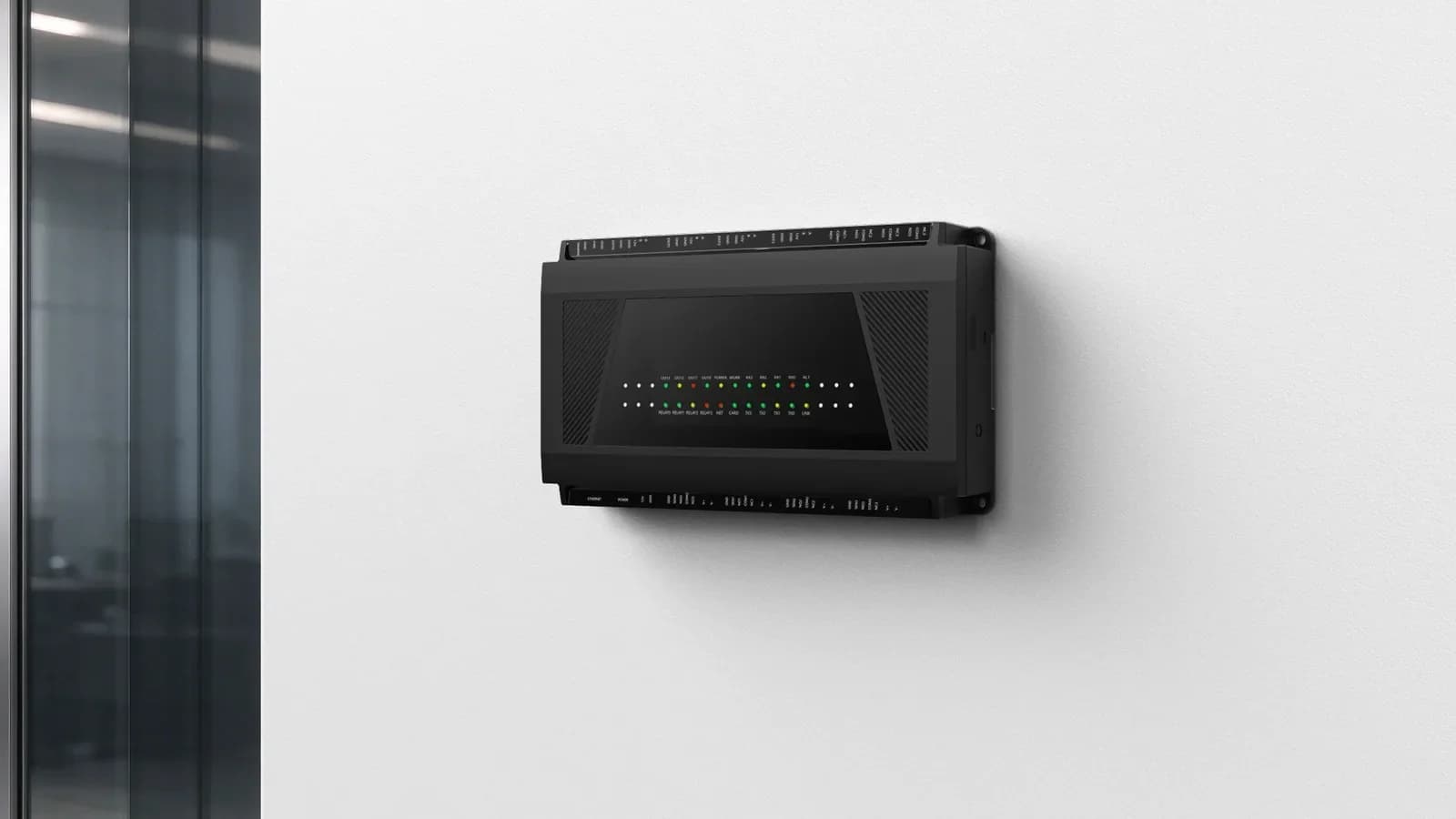
Controller with readers. The FCC4904 is a four-door controller with four RS485 reader ports, relay outputs, door-contact and exit inputs, fire-alarm and tamper inputs, and an Ethernet connection to the host system. With FCC4904, access permissions live on the face recognition terminal (and on some card readers) at the door, not on the controller itself. So when you plan enrollment, removal and offline behavior, plan them for the face recognition terminals and card readers that hold the permissions, not for the controller. The four-door access control solution shows how the parts fit together.
Face terminal with a local face library and whitelist. The FCV5005 shows what a terminal that decides locally can do. With the standard access application, face recognition is verified against the face library stored on the device, so a face can still be recognized when the network is down. Offline card and QR access use a local whitelist, and each entry can have a start and end validity time. The device holds up to 50,000 faces and 50,000 records, and records are uploaded again after the network returns. Feocey recommends agreeing which behavior applies to your configuration and testing network loss and recovery on an evaluation unit before rollout.
Reader that only passes data to a host. A reader such as the FC7735 reads the credential (phone-screen or printed QR, with optional NFC card) and passes it on through the selected output. The connected system validates it and controls the door. With this pattern, the reader does not decide anything, so offline behavior depends entirely on the host behind it.
| Device at the door | What it holds locally | Who decides | Feocey example |
|---|---|---|---|
| Controller with readers | Door wiring, relays, inputs; permissions depend on the system (with FCC4904, not on the controller) | Depends on the system design | FCC4904 (permissions on the face recognition terminal and some card readers, not the controller) |
| Face terminal | Face library and whitelist | The terminal | FCV5005 |
| Reader that passes data | Nothing beyond the read | A host system or controller | FC7735, FC7780 |
What happens when the cloud link drops?
It depends on the device application, operating mode and protocol, so test each model.
Feocey's FAQ is direct about this: behavior "depends on the device application, operating mode and protocol," and different models need not admit or reject users in the same way. It lists what to check: "Check local permission rules, online validation, response timeout and late replies. Confirm whether events are stored and resent after reconnection."
Turn that into questions for each door type:
Make the outage visible to staff, too. In a small-gym discussion, u/Gold_Tangerine_5495 suggested: "I'd make 'status not checked' really obvious so an outage doesn't look like an expired membership." The same idea applies in offices: a door that fails because the link is down should not look like a person who has lost access.
- Does the device hold a local permission list, and how current is it?
- If it validates online, what is the timeout, and does it admit or reject when the timeout passes?
- What happens if the platform's reply arrives late?
- Are events stored during the outage and resent afterwards?
- Can a credential revoked during the outage still open the door?
How do door devices talk to the platform?
Confirm the protocol and documentation for each model and firmware before you commit.
Integration is where many cloud projects slip. Two points from Feocey's documentation are worth remembering:
For Feocey devices with the standard access application, Feocey provides the full MQTT protocol documentation, covering event reporting, remote permission push and face enrollment. Confirm the model and firmware revision before you build against it. Also note that a successful command acknowledgement does not, by itself, prove that the door opened. Check the door-contact or gate feedback as well.
- "A network or serial port does not prove support for a protocol." Confirm the protocol and firmware for the exact model.
- "A device can have local network access without maintaining its platform or messaging connection." Check the network and the platform connection separately.
How do you migrate sites to one platform?
Start by inventorying every door and reader at every site.
Inventory every door and reader first. List every door with its reader model and output, lock type and power, controller, credential format and network. Our four-door access control site survey checklist is a good template. Most surprises in migrations come from doors nobody documented.
Which readers can stay. A reader can stay only if its protocol matches the new controller or terminal. A Wiegand reader does not connect directly to an RS485 reader port, and an RS485 connector alone does not confirm compatibility. On OSDP, Feocey supports it only on the reader (client) side, not as an OSDP controller. See our Wiegand reader and RS485 controller compatibility checklist and integration questions before ordering.
Pilot one site, then repeat. Migrate one site completely, including offline tests, before rolling out. Record the firmware versions and wiring so the next site is a copy, not a new project. Our guides to pilot acceptance and handover and documenting firmware and wiring for repeat installations cover both steps.
How should admin access and audit be controlled?
Anyone with an admin login can change access from anywhere, so control admin roles and keep admin audit logs.
Moving administration to the cloud means anyone with an admin login can change access from anywhere. A widely discussed news story about misuse of a different kind of SaaS system prompted one Hacker News commenter to ask: "this system is standard SaaS and they can sign in from anywhere, not locked to department devices?" It was not an access control product, but the question applies. Ask how admin roles are separated, whether logins can be restricted, whether admin changes are logged, and who reviews those logs.
Which questions should you ask about cloud based access control systems?
Ask about local permissions, outages, protocols, compatibility, admin control, data export and billing.
For question 8, see our guides to mobile access control and access control system cost per door.
| # | Question |
|---|---|
| 1 | At each door type, which device holds permissions, and what happens when the platform is unreachable? |
| 2 | Are events stored offline and resent after reconnection? |
| 3 | Can a credential revoked during an outage still open a door? |
| 4 | Which protocol does each device use, and is the documentation available for our model and firmware? |
| 5 | Which of our existing readers and controllers are confirmed to work, and on what protocol? |
| 6 | How are admin roles, login restrictions and admin audit logs handled? |
| 7 | How do we export users, permissions and logs if we leave? |
| 8 | What is billed per door, per user or per credential, and what changes at renewal? |
What should platform builders and integrators start with?
If you run your own cloud platform and need door hardware for it, start with the protocol documentation and an evaluation unit. Where you need firmware, application or branding changes on a supported model, see OEM / ODM. To review your sites, send us your door inventory, platform and offline requirements. For general questions, see our FAQ.
What is a cloud based access control system?
It is access control where users, permissions, schedules and logs are managed on a hosted platform, while readers, terminals, controllers and locks at each door carry out the decisions.
Do cloud access control doors still work when the internet is down?
It depends on the device application, operating mode and configuration. With the standard access application, the FCV5005 recognizes faces locally and uses a local whitelist for card and QR access. Test outages before rollout.
Can I move multiple sites to one cloud platform without replacing all hardware?
Sometimes. Readers and controllers can stay only where the protocol is confirmed to match. Inventory every door and test a pilot site first.
How do door devices connect to a cloud platform?
Through a documented protocol over the network. For Feocey devices with the standard access application, Feocey provides MQTT protocol documentation for event reporting, permission push and face enrollment.
What happens to access events recorded while offline?
It depends on the device. The FCV5005 uploads records again after the network returns. Ask each vendor whether events are stored and resent.
How do I avoid vendor lock-in with cloud access control?
Ask for protocol documentation, confirm which hardware works with other platforms, and get the data-export process for users, permissions and logs in writing.
Source references
"Best way to standardize access control after acquiring multiple sites?" ↗suggested ↗ask ↗Put the guide to work
Find the reference for your model.
Compare each device with your requirements. Confirm configuration and compatibility for the complete installation.
FCC4904 →
Access controller
Ask about FCC4904 ↗FCV5005 →
8-inch face authentication terminal
Ask about FCV5005 ↗FC7735 →
86-box QR and card reader
Ask about FC7735 ↗FC7780 →
86-box QR and NFC reader
Ask about FC7780 ↗