
QR access control
FC6820 QR Access Control: Top Integration Checks for Temporary Passes
Choose the FC6820 device role and matching application before integrating visitor passes. Follow a practical sequence for permissions, repeated requests and offline acceptance.
Before you choose
Key takeaways.
- Choose the FC6820 reader or access-control configuration before specifying door wiring.
- Treat expiry, repeated requests and offline behavior as application acceptance conditions.
- Retain one agreed matrix and configuration record for the whole pilot.
Temporary passes need an integration contract
FC6820 QR access control starts with two decisions: whether the supplied terminal is a reader or an access-control configuration, and which application manages temporary permissions. Define those decisions before discussing a visitor pass. A QR code that scans successfully is only the first step in a workflow that must also validate permission, operate the intended entrance and report the result.
Recent discussions about guest QR access highlight credential sharing and repeat use as purchasing concerns. Those questions are useful for an FC6820 pilot, but a forum thread cannot establish the terminal’s security functions. Turn each concern into an acceptance condition for the exact terminal, application and host being supplied.
This guide focuses on temporary-pass integration rather than general reader-versus-controller selection. The objective is a testable agreement between the equipment supplier, software integrator and site operator. No temporary-pass policy, API behavior or offline capability should be inferred from the model name alone.
1. Select the FC6820 device role before designing the workflow
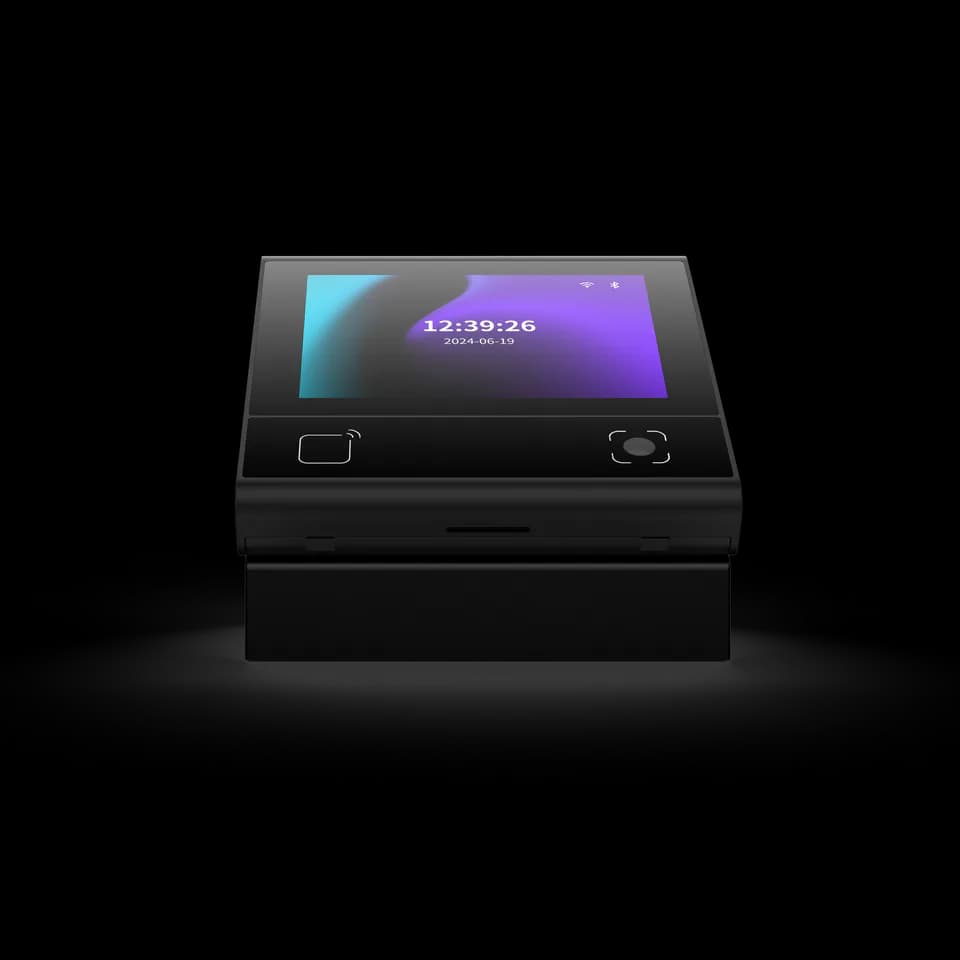
FC6820 is a compact touch terminal with a 3.33-inch, 320 × 480 display and a Linux / DejaOS platform. The product is available in reader and access-control configurations. Its QR and card interaction can form part of an entrance workflow, while the application defines the prompts and the response shown to the user.
The FC6820 reader version passes credential data to a host or controller. The access-control configuration adds exit-switch and door-contact inputs and relay output. Confirm the supplied configuration and cable set before assigning responsibility for door operation; those door-control connections are not a promise for every FC6820 unit.
For a temporary-pass project, draw the chosen arrangement on one page. Mark the terminal, network, permission service, any external controller and the intended entrance. Place the access decision on that drawing. This avoids commissioning a display and reader first, then discovering that no selected component owns the permission check.
2. Match the FC6820 application to the permission host
Ethernet and RS485 describe FC6820 connections, not a universal application interface. Request the protocol reference for the supplied reader or access-control application and confirm its firmware. A working connection to one host does not prove that another host can use the same messages or response format.
Keep standard-device integration and DejaOS development as separate procurement choices. A standard application requires its matching protocol and supported operating mode. A DejaOS development project requires agreement on the target firmware, application work and support responsibility. An SDK example does not establish the API of the application supplied on every stock terminal.
Before software work begins, ask the integrator to document how credential data is represented, how the receiving system identifies the terminal, and what response the terminal expects. Include timeouts and error results. These are interface questions to confirm against the chosen application, not additional functions asserted for FC6820.
3. Describe the full temporary-pass lifecycle
The permission system should have an agreed lifecycle for issuing, activating, extending, revoking and expiring a visitor pass. For each transition, record the permitted entrances and the effective time. The FC6820 project then has a concrete policy to implement and test instead of a vague requirement to support temporary QR codes.
Consider a visitor whose appointment moves from the morning to the afternoon. Decide whether reception changes the existing permission or issues a new one, how an earlier code becomes unusable, and what the terminal should display when the visitor presents it. The visitor-facing message should explain the next step without exposing unnecessary personal or permission data.
Separate the time printed in an invitation from the time used by the permission decision. Identify the clock and time zone that govern acceptance, and check the result around the validity boundary. FC6820 expiry handling must be demonstrated in the selected arrangement; the QR image alone does not prove where that check occurs.
4. Make repeat scans and duplicate requests part of the design
A visitor may scan twice because the first response is slow or unclear. The network or application may also repeat a request. Agree how the host distinguishes a new presentation from the same event being handled again, and whether a repeated request may create a second door command. Specify the outcome rather than assuming the terminal provides it.
For a single-use visitor policy, define what consumes the permission. Possible project choices include an authorization decision, a door command or confirmed passage, but those events are not interchangeable. Select one meaning with the site operator, then verify that the chosen application and door arrangement can support the required evidence.
Where several entrances share a temporary pass, test their combined behavior. A rule checked only at one terminal may not express the project’s intended reuse restriction at another entrance. Ask the integrator to demonstrate the agreed coordination in the actual permission system, and document any limitation before expanding the deployment.
5. Use a staged integration sequence
A staged FC6820 pilot makes a failed result easier to locate. First establish the terminal configuration and message path, then the permission decisions, then door behavior and operator handling. Keep the same sample, application version and host settings throughout the acceptance run so that the results describe one reproducible arrangement.
- Record the FC6820 reader or access-control configuration, firmware, application and supplied cable set.
- Connect the selected host and prove that a scan reaches the correct terminal record without operating a door.
- Apply a valid permission and confirm that the response identifies the intended entrance and result.
- Connect the approved door-control arrangement and check one authorized command at the correct door.
- Run expired, revoked, repeated and unavailable-host cases using the agreed expected results.
- Retain the final configuration, test evidence and operator instructions before ordering repeat units.
6. Build a temporary-pass acceptance matrix
The following matrix is a proposed test specification for an FC6820 project, not a list of factory functions. Replace the proposed outcomes with the site’s approved rules, then ask the integrator to demonstrate them. A test that depends on an unconfirmed application feature should stay open rather than being marked as passed.
For every case, capture the credential status, terminal identity, decision result and physical outcome. Where the selected platform provides event records, compare them with the observation at the entrance. If the platform cannot provide the required evidence, record that gap and decide how the site will verify the workflow.
| Test case | Proposed acceptance condition | Evidence to retain |
|---|---|---|
| Valid pass at assigned entrance | One intended authorization and door command | Terminal, host result and observed door action |
| Readable but expired pass | Permission denied; visitor receives the agreed next step | Decision time and permission validity |
| Permission revoked before arrival | Old pass cannot authorize entry | Revocation status and scan result |
| Visitor scans twice quickly | No unintended duplicate door action | Both presentations and command history if available |
| Same pass at another entrance | Apply the approved entrance and reuse rules | Results from both entrances |
| Host unavailable, then restored | Follow the agreed interruption policy; no stale unintended command | Interruption timeline and recovery observation |
7. Agree offline and recovery behavior explicitly
An FC6820 project needs a defined response when the permission host or network is unavailable. Determine whether the selected application rejects requests, uses a specifically approved local method or requires operator assistance. Do not assume local caching, offline expiry validation or automatic synchronization simply because the terminal runs Linux / DejaOS.
Recovery deserves a separate test. Present a pass during an interruption, restore the connection and observe whether an old request can produce a delayed door action. Agree what should happen to pending requests and operator messages. The chosen application must demonstrate the required behavior; this guide does not assert a particular queue or replay mechanism in FC6820.
The site’s emergency exit and electrical design remain responsibilities of the qualified project team. Define reception assistance and normal entry exceptions alongside that design. An unavailable visitor service should have a documented escalation route, so staff do not improvise a permanent bypass to keep the entrance moving.
8. Make the FC6820 screen and mounting part of acceptance
The FC6820 display is an interaction surface for the selected application. Review the scan instruction, progress indication and final result with a first-time visitor. A visitor should be able to distinguish a code read from a completed access decision and know when reception assistance is required. Test the actual screen flow rather than approving a static interface illustration.
For a wall installation, confirm the 86-type box arrangement, mounting frame and rear cable route. For a desktop interaction, confirm the stand separately. The approved mounting guidance and supplied parts should determine the installation, including access to the reading area and space behind the terminal.
Wi-Fi and voice are configuration options for FC6820, not assumptions for the base order. Record any required option, its application dependency and the project test that verifies it. A desktop photograph or a development example should not silently become a promise about included accessories or software.
Send a focused FC6820 integration request
Prepare an enquiry with the FC6820 device role, intended permission host, temporary-pass lifecycle, repeat-use rule, installation drawing and acceptance matrix. Add the expected visitor volume as a project requirement for discussion, without treating it as an already confirmed throughput capability. Ask the supplier and integrator to identify any remaining development or configuration work.
Review the FC6820 product information, matching user manual and hardware integration route. Request the protocol for the exact supplied application. The best integration choice is the one that demonstrates the required visitor journey with clear ownership of exceptions and repeatable evidence, before the project moves beyond the pilot.
Source references
FC6820 user manual ↗Buyer discussion: guest QR credentials (Reddit; anecdotal) ↗Put the guide to work
Find the reference for your model.
Compare each device with your requirements. Confirm configuration and compatibility for the complete installation.
FC6820 →
Display QR and card terminal
Ask about FC6820 ↗