
Attendance planning
Staff Attendance Software Requirements: Plan Shift Changes Before Choosing a Terminal
Staff attendance software needs clear shift-change rules. Use an FCV4907 evaluation to test overnight work, breaks, shared terminals and exceptions.
Before you choose
Key takeaways.
- Define the working period separately from the calendar timestamp.
- Keep employee assignment, terminal location and building access as distinct rules.
- Use real shift-change examples to accept the selected terminal and application together.
Staff attendance software starts with the working day
Staff attendance software should explain which working period a clock-in belongs to before the organization selects a terminal. Overnight shifts, changing assignments and shared entrances can turn a perfectly readable event into the wrong attendance result. The best starting point is a small set of real shift examples, with an expected outcome that supervisors and HR both understand.
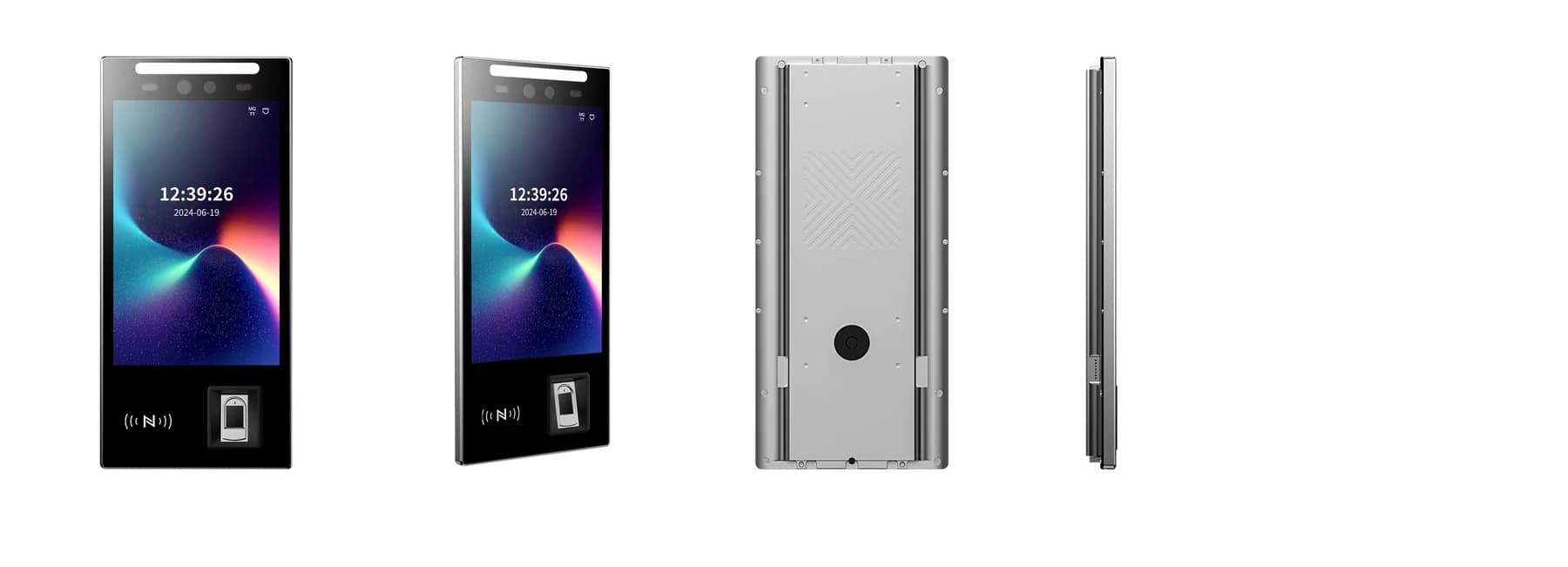
FCV4907 combines a portrait touch display and fingerprint reader for configured access or attendance interactions. Treat the terminal as the point where an employee identifies or records an action; assign shift interpretation to the selected attendance application. This guide focuses on shift requirements, while the attendance-to-HR handover guide covers downstream reconciliation.
1. Define a working period that can cross midnight
Staff attendance requirements need a business date as well as a calendar timestamp. An employee may start late in the evening and leave the following morning, but the organization may regard those actions as one working period. Document how the attendance application associates both events with that period, including the rule for work continuing beyond the expected end.
Use a concrete test: a shift starts on Monday evening, ends on Tuesday morning and includes a late departure. Ask the software team to show the event times and the assigned working period separately. Keep local time, the site's time zone and any clock adjustment understandable. A face or fingerprint identification does not determine the correct shift date by itself.
2. Separate an employee assignment from the terminal location
A staff attendance system needs to know whether a person is allowed to record at a terminal and whether that action belongs to the person's current assignment. A shared entrance may serve several departments, contractors and rotating teams. The device location can identify where an event occurred without deciding which department or shift owns it.
Test a temporary transfer and a worker who covers a different shift for one day. Record who authorizes the change, when it takes effect and how a late update is handled. Confirm how the selected platform links employee identity to assignments rather than relying on a display name or a permanent department field. Access permission at the building entrance should remain an independently defined rule.
A useful reassignment case keeps the same test employee and credential while changing only the approved shift. Compare the result with an unchanged colleague at the same terminal. That pair helps the team identify whether the issue comes from employee mapping, assignment timing or a terminal-wide setting. Retain the agreed expected result alongside the observed event, so a later configuration change can be checked against the same case rather than a different demonstration.
3. Explain breaks and repeat presentations to employees
Staff attendance software must distinguish an intended break action from someone trying the reader again because the feedback was unclear. Specify whether employees select an action, follow a scheduled sequence or use another approved workflow. The screen instruction, application record and supervisor's interpretation should describe the same action.
For an FCV4907 pilot, confirm the supported interaction with the actual application and credential configuration. Demonstrate one ordinary break, a repeated identification and a return after an unexpectedly long absence. Define how an operator corrects an ambiguity without silently deleting the original evidence. Do not infer a complete break-management workflow from the presence of a touch screen or fingerprint module.
4. Build a shift-change acceptance table
The attendance requirements table should contain expected business results, not only device responses. Use the examples below as a starting point, then replace the timing and approval rules with the organization's own process. The table is a planning aid rather than a statement of built-in FCV4907 software functions.
| Scenario | Question for the attendance application | Acceptance evidence |
|---|---|---|
| Overnight shift | Which working period owns the start and finish? | Both events retain their time and map to the agreed period. |
| Last-minute reassignment | Who changes the worker assignment and from when? | The approved change affects the intended period only. |
| Shared terminal | How are location and employee assignment kept distinct? | A valid interaction does not silently change the worker profile. |
| Missed break action | Who may correct the interpretation? | The original event and approved correction remain understandable. |
| Delayed delivery | Does the application use event time or receipt time? | A late record reaches the correct working period. |
5. Test a busy handover using representative interactions
A shift-change pilot should resemble the place where employees actually pause. Check the approach, screen visibility, credential presentation and the route taken after the interaction. Test the selected mounting arrangement rather than timing a terminal on a desk and assuming the entrance will behave identically.
Use a small representative group and record the observed interaction time, retry count and operator interventions. Those observations help the project choose a practical layout; they are not a published throughput or recognition-rate claim. Include employees using the approved alternative method, and explain whom they should contact when the expected interaction does not succeed. Keep the attendance queue separate from the building's independently reviewed exit arrangements.
6. Use a short requirements pack for procurement
An attendance requirements pack helps the software team and hardware supplier evaluate the same workflow. A statement such as "supports attendance" leaves the shift rules unanswered. Describe the expected action and the evidence required at each handover, including the procedure when a terminal or connection is unavailable.
- Provide ordinary, overnight and reassigned shift examples with the expected working period for each event.
- Name the application that owns schedules, break interpretation, corrections and final attendance output.
- Identify the employee identifier and the approved credential alternatives for the selected FCV4907 configuration.
- Describe site time zones, clock maintenance and how delayed events should be assigned.
- Record the entrance layout, shared-terminal users and the operator route for unclear interactions.
- Agree a pilot sign-off owner and an unresolved-issues list before rolling out more terminals.
Request an FCV4907 sample around your shift scenarios
Review the FCV4907 product page, matching downloads and hardware integration options. Confirm the supplied credential modules, application firmware and interface before designing the attendance handover.
Include two sample shifts, the receiving attendance system and the expected screen interaction in your FCV4907 project enquiry. State whether the scope is terminal integration or a wider software-and-hardware evaluation. A useful quotation starts with a testable attendance requirement, while payroll calculations and local operating policies stay with the teams responsible for them.
Source references
FCV4907 user manual — confirm the supplied configuration ↗Put the guide to work
Find the reference for your model.
Compare each device with your requirements. Confirm configuration and compatibility for the complete installation.
FCV4907 →
Face authentication terminal
Ask about FCV4907 ↗