

The original FEOCEY X GEN1 is designed for a quick interior retrofit on a compatible deadbolt. Keep the exterior cylinder and key, then complete App setup, calibration and function checks for that installation.
Can this smart lock be installed without drilling?
For the original FEOCEY X GEN1 / X-Gen 1 Smart Lock 001, the documented method replaces the indoor thumbturn and uses a mounting plate and matching adapter on the existing deadbolt. The outside hardware remains in place. On a compatible, correctly functioning lock, this is an interior retrofit rather than a new full lock installation.
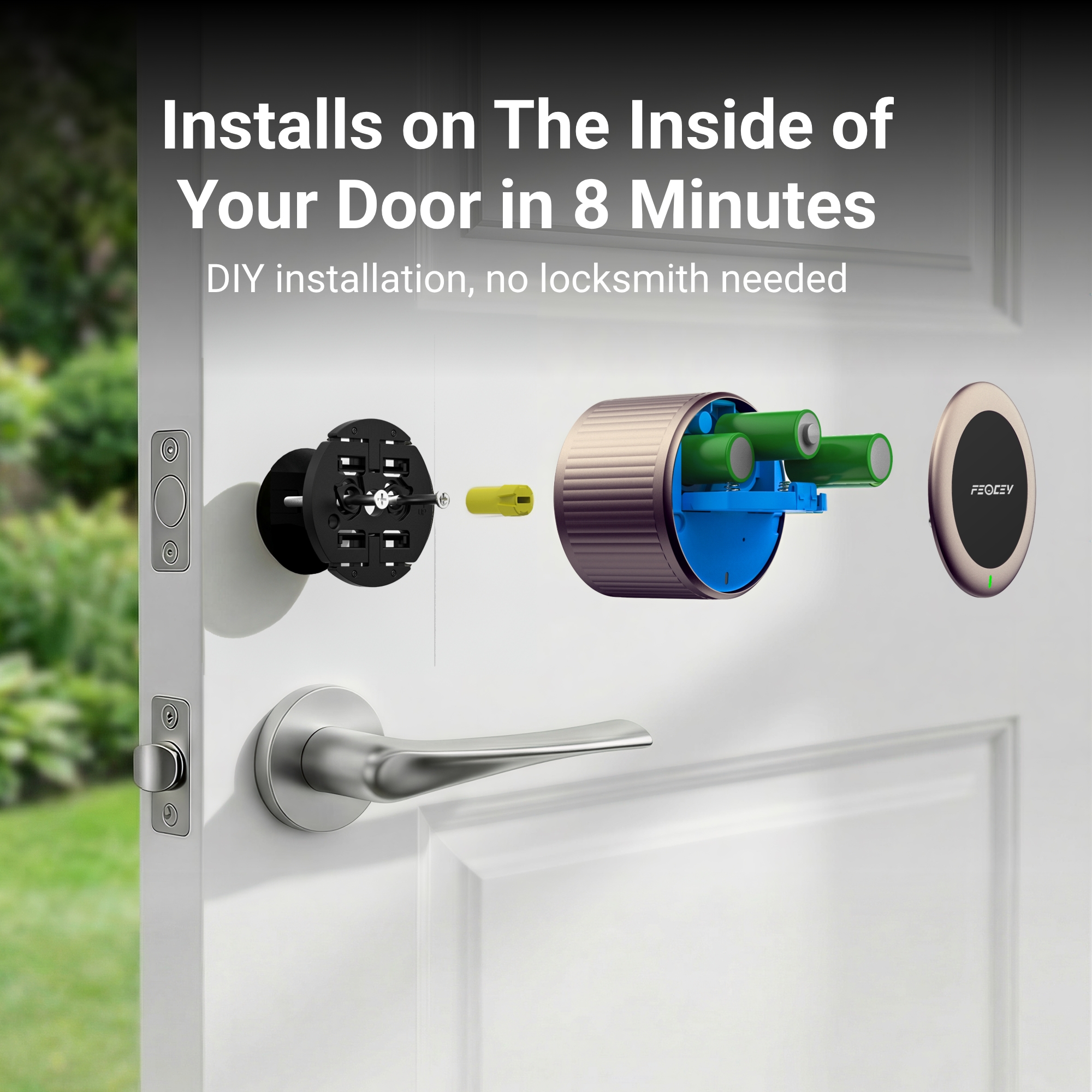
Feocey’s original X GEN1 catalogue and supplied product artwork describe an 8-minute interior DIY installation. That is the manufacturer’s model-specific installation claim. It is not a promise that every door, full replacement lock, App registration, Wi-Fi connection and commissioning test will be completed within eight minutes.
A replacement smart lock, including Smart Door Lock 002 or the newer Tuya models, needs its own door-thickness, lock-body and hole-pattern checks. Do not use this retrofit guide as their installation manual. Renters should obtain any required property approval even when the exterior remains unchanged.
Check the existing deadbolt before buying
- Confirm a compatible single-cylinder deadbolt and an interior thumbturn that can be replaced.
- Measure the backset. The X GEN1 manual describes 2-3/8-inch or 2-3/4-inch positions.
- Check the existing tailpiece and select the matching supplied adapter and mounting arrangement.
- Confirm the bolt operates smoothly by hand, with the door open and closed. Address rubbing or misalignment first.
- Leave clearance for the interior body and battery cover, and retain access to the existing exterior key cylinder.
Send photos and measurements if the lock or adapter is uncertain. An existing hole diameter alone does not prove compatibility, and this guide does not prescribe a universal bore or door-thickness range for every smart lock.
Fit the interior hardware
Follow the illustrated X GEN1 manual for the actual assembly. Keep the door open while fitting and testing the lock.
- Put the existing deadbolt in the unlocked position. Remove the interior thumbturn screws and thumbturn; remove an additional backplate if the manual’s arrangement requires it.
- Position the mounting bracket with its UP mark in the documented direction and secure it with the correct supplied screws.
- Select the adapter that matches the existing tailpiece. Fit it in the orientation shown in the manual.
- Align the smart lock with the bracket and adapter, then seat it as illustrated. Confirm smooth manual movement in both directions.
- Open the battery compartment and install three CR123A batteries with the indicated polarity. Close the battery and magnetic covers.
Use the suitable screwdriver and installation parts for the supplied kit. If a bracket cannot sit securely, the tailpiece does not match, or the lock binds, stop and obtain the correct fit guidance rather than drilling or forcing the mechanism to follow a generic tutorial.
Pair, calibrate and connect
Use FEOCEY Home for the original X GEN1. The manual describes account creation, household setup, Bluetooth pairing, initial calibration and then network configuration.
- Turn on the phone’s Bluetooth and add the device using the product’s documented QR-code or serial-number flow.
- Follow the App’s calibration sequence for the closed door, locked position, unlocked position and open door.
- For remote operation, configure a stable 2.4 GHz Wi-Fi connection through the product settings.
- Pair a compatible Magic keypad if PIN entry is required. Confirm the lock, keypad and firmware combination.
The product manual supports Alexa integration. Use the matching connection guide and account configuration; do not assume Apple HomeKit, Google Home or another platform is supported by the same product merely because it appears in a generic smart-lock checklist.
Test before relying on the lock
- Check smooth manual operation, first with the door open and then with the latch aligned in the strike.
- Test the retained physical key from outside and keep a controlled backup-access plan.
- Check nearby Bluetooth control, and test remote control separately with the phone off the local Wi-Fi network.
- After calibration, verify automatic locking and door-position alerts with the actual door and selected settings.
- Test any optional keypad credentials and the intended offline behaviour on the installed firmware.
- Confirm the low-battery indication and show the user how to replace the specified batteries.
When setup fails, check adapter fit, latch alignment, battery condition, account permissions and Wi-Fi band or signal as appropriate. Do not weaken a Wi-Fi password or assume special characters must be removed as a general repair.
Planning several doors?
Before ordering a batch, send interior and exterior photos, deadbolt and tailpiece details, backset, handing, quantities, deployment market and network conditions. Validate a representative installation and its access workflow before repeating it across a property.
If the project needs a replacement lock instead of an interior retrofit, compare the correct product and its manual. Installation speed is useful, but a verified fit, a secure fixing and a tested backup-access plan determine whether the result is ready to use.
Quick answers
Does eight minutes include every setup and test?
The original manufacturer material describes the interior hardware installation. Allow for compatibility checks, App setup, network conditions, calibration and commissioning separately.
Can I keep the original exterior key?
Yes, the documented X GEN1 retrofit retains the compatible existing exterior cylinder and mechanical key.
Can I follow this guide for the new Tuya smart locks?
No. Their lock bodies, fitting conditions and App instructions are model specific; use the matching manual.
Product references
- X GEN1 Product Manual, product introduction and basic parameters (PDF pp. 2, 4).
- X GEN1 Product Manual, installation, calibration and function matrix (PDF pp. 6–11).
- Original Feocey product catalogue, X Wi-Fi Smart Lock (PDF p. 6).
- Original manufacturer X GEN1 interior-installation artwork (8-minute installation claim).
References identify the original X GEN1 product and the separate R model. Match the supplied hardware, firmware, accessory and application before applying a specification.
Review the right lock for your doors.
Share the lock photos and measurements, quantity, deployment market, access methods and network conditions. For X GEN1, include the existing deadbolt and adapter details.